As an Amazon Associate I earn from qualifying purchases. Links marked "at Amazon" are paid links.
How to measure a small workspace before you buy anything
 By Chris Y. · Founder & editor
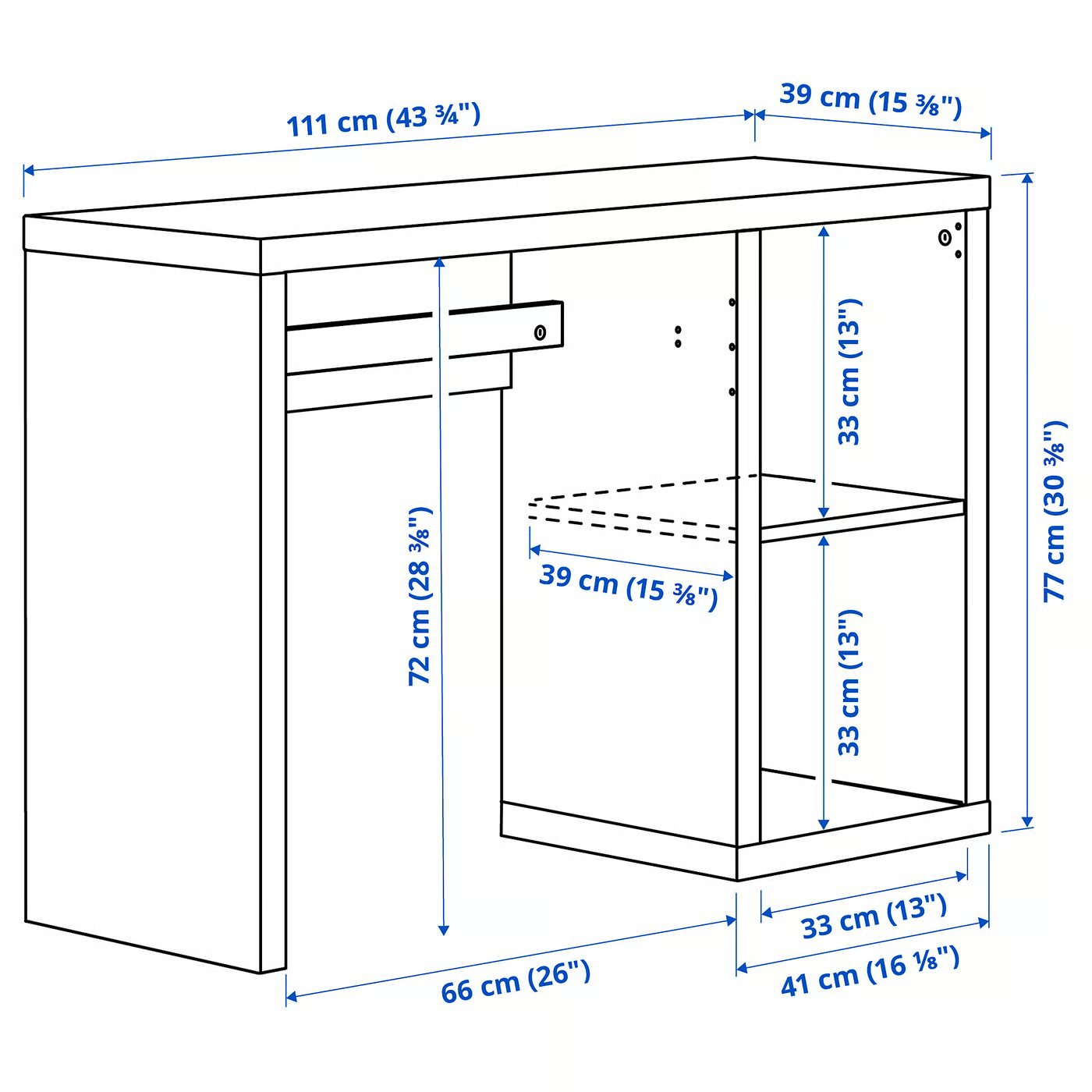
Almost every returned desk is a measuring failure rather than a taste failure. The desk arrives, it fits the wall, and then the chair will not go under it, or the room stops having a walkway, or the monitor ends up 18 inches from your face and every evening feels an hour longer than it is.
Four numbers prevent all of that, and they take about ten minutes with a tape. You need the depth the room can give up, the depth the desk needs for your screen, the clear height under the top for your knees, and the height above the desk before a shelf or a cabinet becomes a problem. This page shows how to take each one, gives you the published figures for the desks and arms we recommend so you can check yours against real numbers, and ends with the rule for the marketplace desk that publishes nothing at all.
Questions people ask
What is the standard desk height?
About 29 to 30 inches for a fixed desk — the IKEA MICKE is 29½ inches and the KALLAX desk 30⅜. That figure assumes an adjustable chair, because the desk is the fixed part and the chair is what adapts. UCLA's guidance is to set the chair so your elbows sit at roughly 100 to 110 degrees at the keyboard, then raise your feet on a rest if they no longer reach the floor.
How far should a monitor be from my eyes?
CCOHS puts the eye's resting point of accommodation at about 80 cm — roughly 31.5 inches — and suggests an arm's length as a practical estimate, and UCLA says to sit at least an arm's length away and adjust for your vision. On a desk shallower than about 24 inches that is not reachable with a factory monitor stand, which is what monitor arms are for.
How high should the top of the monitor be?
CCOHS suggests the screen center about 15 degrees below the horizontal line of sight, and says the monitor should sit between horizontal and 35 degrees below it — looking upwards is tiring. UCLA phrases the same thing as putting the top third of the monitor at seated eye level.
How much clearance do I need under the desk?
Enough for your knees plus the chair's armrests at their lowest setting, and then enough again for anything you bolt under the top. IKEA publishes 28⅜ inches of clearance on the KALLAX desk; a 4.5-inch cable tray takes that to about 23.9 and a 7-inch one to about 21.4.
Is 15 inches deep enough for a desk?
For a keyboard, a mouse and a laptop, yes — a full-size keyboard is about 6 inches deep and a laptop about 9. It is not enough for a monitor standing on the desk, which is why a shallow desk and a clamp-on monitor arm are usually bought together.
How much room does a chair need behind the desk?
About 30 inches to sit in and stand up from, and another 24 to 30 beyond that if anyone walks past. Measure the wall-to-obstacle distance first and subtract the chair allowance; what remains is the deepest desk the room can take.
Number 1: how much depth the room can give up
Start with the room, not the desk. Measure from the wall you want the desk against to the nearest thing you cannot move — a bed, a sofa, a radiator, the swing of a door. Write that number down. It is the total budget, and everything else comes out of it.
Out of that budget the chair takes about 30 inches: roughly 20 for the chair itself and 10 more to push it back and stand up. A walkway past the back of the chair wants another 24 to 30 inches if anyone actually walks there.
So a 15⅜-inch desk in a room with 80 inches of wall-to-bed distance leaves about 35 inches of clear floor after the chair. A 24-inch desk in the same room leaves about 26. That nine-inch difference is why depth, not width, is the first thing to measure. Desk depths in our compact desk guide run from 15⅜ to 24 inches, and every one of them publishes the figure.
Number 2: the depth your monitor needs
This is the number that surprises people, and the reason a shallow desk is not automatically the right answer.
Canada's CCOHS describes the eye's resting point of accommodation as typically around 80 cm — about 31.5 inches — and its resting point of vergence further out still, averaging around 112 cm, or about 90 cm at a 30-degree downward viewing angle. It suggests an arm's length as a practical estimate of where a monitor should sit. UCLA's ergonomics guidance says the same thing more bluntly: sit at least an arm's length from the screen, then adjust for your own vision.
Now measure your monitor's stand. A typical 24 or 27-inch panel sits 8 to 10 inches forward of the back edge of its own base. On a 19⅝-inch-deep desk pushed against a wall, that puts the panel around 10 inches from the back of the desk, and your eyes are about 20 inches from it once you are sitting at the keyboard. That is a long way inside the distance CCOHS describes as comfortable.
There are two honest fixes and they cost different amounts:
- Buy the depth in the desk. Around 24 inches lets a factory stand put the screen at roughly arm's length. That is the deepest desk in our guide, and it costs you nine inches of floor.
- Buy the depth back with an arm. A clamp at the back edge cantilevers the panel out over the edge and returns the stand's footprint to the worktop. The arms in our monitor arm guide publish maximum extensions from 18.5 to 24 inches, which is more than enough to put a screen behind the desk line.
The second fix is why so many of the shallow desks in this guide are worth buying. It converts a furniture problem into an accessory problem.
Number 3: clear height under the top
Measure your knee height sitting in the chair you will actually use — floor to the top of your thigh where it meets the desk — and add an inch. Then measure the chair's armrests at their lowest setting, because on most task chairs the arms, not the knees, are what hit the desk.
Compare that against the desk's clear height, which is not the same as its height. IKEA publishes 72 cm (28⅜ in) of clearance under the 77 cm (30⅜ in) KALLAX desk top — a five-eighths-inch top and no rail. A desk with a drawer, a keyboard tray or a front crossbar can lose three to five inches of that, and almost nobody publishes the figure.
| Desk | Published height | Published clearance underneath |
|---|---|---|
| IKEA KALLAX Desk | 30⅜ in | 28⅜ in |
| IKEA MICKE Desk | 29½ in | Not published by IKEA |
| Mount-It! MI-8035 electric desk | 28.7 to 46.5 in | Not published by Mount-It! |
| VIVO DESK-V111VT mobile desk | 25.7 to 51.2 in | Not published by VIVO |
| Branch Daily Desk | 28.5 in | Not published by Branch |
Four of five publish nothing, which tells you how this category is sold. Where the figure is missing, subtract the top thickness and any drawer depth from the desk height yourself, and treat the result as an estimate you will confirm on arrival.
Then remember the thing you are about to bolt under there. A cable tray takes its own height out of your knee space: the shallowest tray in our cable guide is 4.5 inches tall and the deepest is 7. On a 29-inch desk that is the difference between 24.5 and 22 inches of knee room.
Number 4: the clearance above the desk
If a shelf, a wall cabinet or a window sill sits above the desk, measure from the desk surface to its underside. Three things compete for that space and people forget all three:
- The monitor. A 27-inch panel on its own stand is roughly 18 to 20 inches tall overall.
- The arm's travel. Arms in our guide publish maximum screen heights from 16 to 20.8 inches at screen center, which means the top of the panel can reach 10 inches higher than that.
- The lamp. A monitor bar clips over the top bezel and adds a couple of inches above the panel; a clamp arm lamp sweeps through a wider arc than that.
Twenty-four inches of clearance above the desk is comfortable for a 27-inch screen on an arm. Below about 20 inches you are choosing between raising the screen and keeping the shelf.
Where the screen should end up
Two published rules are worth holding the tape against once everything is in place.
CCOHS says the reasonable position is the monitor about 15 degrees below the horizontal line of sight — creating a comfortable visual zone of 30 degrees — and that the screen should sit between horizontal and 35 degrees below. It also notes that looking upwards, above the horizontal, is tiring. UCLA puts the top third of the monitor at seated eye level, which lands in the same place from the other direction.
For the keyboard, UCLA's guidance is elbows in a slightly open position — it gives 100 to 110 degrees in its workstation setup and 90 to 100 degrees for the arm and elbow angle — with wrists and hands straight and the keyboard directly in front of your body. In practice that means a desk height near 29 inches for most adults sitting in a chair set to their own leg length.
If you are buying a sit-stand desk, CCOHS adds the standing test: the platform should land at roughly your standing elbow height, with the keyboard and mouse aligned as they are when seated and the monitor still between horizontal and 35 degrees below. Measure floor to elbow standing and compare it against the top of the desk's range — 46.5 inches on the Mount-It! desk in our guide, 51.2 on the VIVO mobile desk.
Two more numbers for cabinets and shelves
If storage is going on the same wall, two clearances decide whether it works.
Above a desk, a shelf wants 16 inches of clear height if you intend to put anything under it other than air, and more if a monitor lives there. A shelf at 14 inches above a 29-inch desk sits at 43 inches from the floor, which is exactly the height a standing person's head arrives at when they lean in.
Beside a desk, a cabinet or drawer unit wants its door swing measured, not its footprint. A 16-inch-wide unit with a hinged door needs 16 inches of clear floor in front of it as well, and in a room where the chair is already using 30 inches of that, the two overlap. IKEA's KALLAX desk avoids the problem by making the storage the leg: its cubes are 13 inches square and open forward with no door at all.
The rule for a desk that publishes nothing
If a product page gives a width and a depth and nothing else — no height, no clearance, no load rating — treat it as a surface of unknown height that may or may not take your chair and may or may not hold a monitor arm. There are enough desks that publish all four for that to be a reason to buy something else.
The same applies to accessories. Of the six cable products in our guide, three publish no load rating at all. Of the six monitor arms, every one publishes an extension and a weight range, which is why that category was the easiest to compare and this one is the hardest.
The ten-minute checklist
- Wall to the nearest immovable object. Subtract 30 inches for the chair. What is left is the desk depth you can afford, plus any walkway you need.
- Your monitor's stand depth, and your eye-to-screen distance sitting normally. If it is well under an arm's length, budget for a monitor arm rather than a deeper desk.
- Knee height and chair armrest height, against the desk's clear height underneath — then subtract the height of any cable tray you plan to fit.
- Desk surface to the underside of anything above it. Twenty-four inches is comfortable for a 27-inch screen on an arm.
- Your desk top's thickness at the back edge, where a monitor arm or a clamp lamp will actually grip. Clamp ranges in our guides start at 0.2 to 0.4 inches and stop between 1.97 and 3.5.
- Floor to elbow, seated and standing, if a sit-stand desk is on the list.
Take those numbers to the compact desk guide, where every pick lists its published depth and height, or to standing desk versus desk converter if you are still deciding between replacing the desk and putting a riser on it.
Sources
- CCOHS — Office Ergonomics: Positioning the Monitor (viewing angle, viewing distance, resting point of accommodation)
- CCOHS — Office Ergonomics: Sit/Stand Desk (standing elbow height, how long to stand)
- CCOHS — Office Ergonomics: Space Requirements for Office Work
- UCLA Ergonomics — 4 Steps to Set Up Your Workstation
- UCLA Ergonomics — Postural Guide
- IKEA — KALLAX Desk (dimensioned drawing: 111 × 39 × 77 cm, 72 cm clearance)
- IKEA — MICKE Desk (28 3/4 × 19 5/8 × 29 1/2 in)